
LMS Buyer's Guide
Best Cloud-Based LMS Platforms in 2026
Compare the best cloud-based LMS platforms for 2026. Go live in days with no servers to maintain, automatic updates, elastic scaling, and predictable subscription pricing.
Last Updated: October 2026
The cloud-based LMS has become the default way organizations buy learning technology, displacing the on-premise systems that dominated the 2000s. A cloud-based LMS (also called a SaaS or hosted LMS) runs on the vendor's infrastructure and is accessed through a web browser — the vendor handles hosting, security, scaling, backups, and updates, while customers pay a predictable subscription instead of a large upfront license plus ongoing maintenance. The shift accelerated sharply with remote and hybrid work, and search demand for 'cloud based lms' has climbed steeply year over year as organizations retire self-hosted deployments. The advantages are concrete: deployment in days rather than months, no infrastructure or IT maintenance burden, automatic updates with no disruptive upgrade projects, elastic scaling from a handful of learners to hundreds of thousands, and anywhere-access for distributed teams. The trade-offs worth evaluating are data residency and compliance (where is learner data stored?), depth of integration with internal systems, and dependence on the vendor's uptime and roadmap — all manageable with the right provider. For the large majority of organizations in 2026, cloud is the correct default unless a specific regulatory or security mandate requires self-hosting. This guide covers what separates a strong cloud-based LMS from a weak one, the evaluation criteria that matter, and realistic costs.
Who Needs This?
IT Director
Maintaining a self-hosted LMS consumes engineering time on patching, security, and scaling that should go to core systems
A fully managed cloud LMS removes the maintenance burden entirely — the vendor handles hosting, security, and updates
L&D Manager
The current on-premise system takes months and a vendor engagement to upgrade, so it's perpetually out of date
Cloud delivery means automatic updates and new features with zero upgrade projects or downtime
Operations VP at a Distributed Company
Remote and frontline staff need reliable anywhere-access that on-premise hardware struggles to provide without over-provisioning
Browser-based cloud access plus mobile apps reach every worker, with elastic scaling that matches actual demand
Key Challenges
On-Premise Maintenance Burden
Self-hosted LMS platforms demand internal IT for installation, patching, security, and scaling — overhead most organizations can no longer justify.
Slow, Expensive Deployment
Legacy on-premise systems take months and large upfront license fees to stand up. Cloud platforms go live in days on a predictable subscription.
Scaling and Remote Access
Distributed and hybrid workforces need anywhere-access and elastic capacity that on-premise hardware struggles to deliver without over-provisioning.
Must-Have Features to Look For
Why Arythmatic Is the Best Choice
Arythmatic is a modern, all-in-one learning infrastructure platform. Here's why it leads the pack:
- 1.Fully cloud-based — go live in days with zero servers to manage
- 2.Automatic updates and new features with no IT involvement
- 3.Elastic scaling with flat-rate pricing that doesn't penalize growth
- 4.Native live sessions, SCORM/xAPI, white-label, and billing in one cloud platform
- 5.Encryption, granular access control, and audit-ready reporting built in
Compare Top Platforms
| Platform | Live Sessions | White-Label | SCORM | Community | Pricing |
|---|---|---|---|---|---|
| Arythmatic | ✓ | ✓ | ✓ | ✓ | From $49/mo |
| Thinkific | ✗ | ✗ | ✗ | ✓ | $36–49/mo |
| Teachable | ✗ | ✗ | ✗ | ✗ | $29–39/mo |
| Kajabi | ✗ | ✓ | ✗ | ✓ | $149–399/mo |
| Podia | ✗ | ✗ | ✗ | ✓ | $33–39/mo |
| LearnWorlds | ✗ | ✓ | ✓ | ✓ | $24–29/mo |
| FreshLearn | ✗ | ✗ | ✗ | ✓ | $29–49/mo |
How to Evaluate LMS Platforms for This Use Case
Typical Implementation Timeline
Evaluation & Trial
Define requirements, confirm data residency and security needs, and trial 2-3 cloud platforms with real content.
Configuration & Branding
Apply branding and custom domain, configure roles and SSO, and import existing SCORM/xAPI content — no server provisioning required.
Pilot
Roll out to one team, validate completion tracking, reporting, and mobile access, and gather feedback.
Full Rollout
Expand organization-wide, enable automated reminders and certifications, and set a content review cadence. Cloud scaling needs no hardware planning.
What Does an LMS Cost?
Cloud-based LMS pricing in 2026: SMB plans run $50-500/month flat-rate or $1-15/user/month; mid-market deployments typically land at $15K-75K/year all-in including setup; enterprise cloud contracts (Docebo, Cornerstone) can exceed $100K. Self-hosted alternatives like Moodle are license-free but carry hosting ($20-200/month) plus IT maintenance time that often exceeds a cloud subscription's total cost. Arythmatic is fully cloud-based at flat-rate pricing from $49/month with 0% transaction fees, no separate setup engagement, and no per-user penalty as you scale.
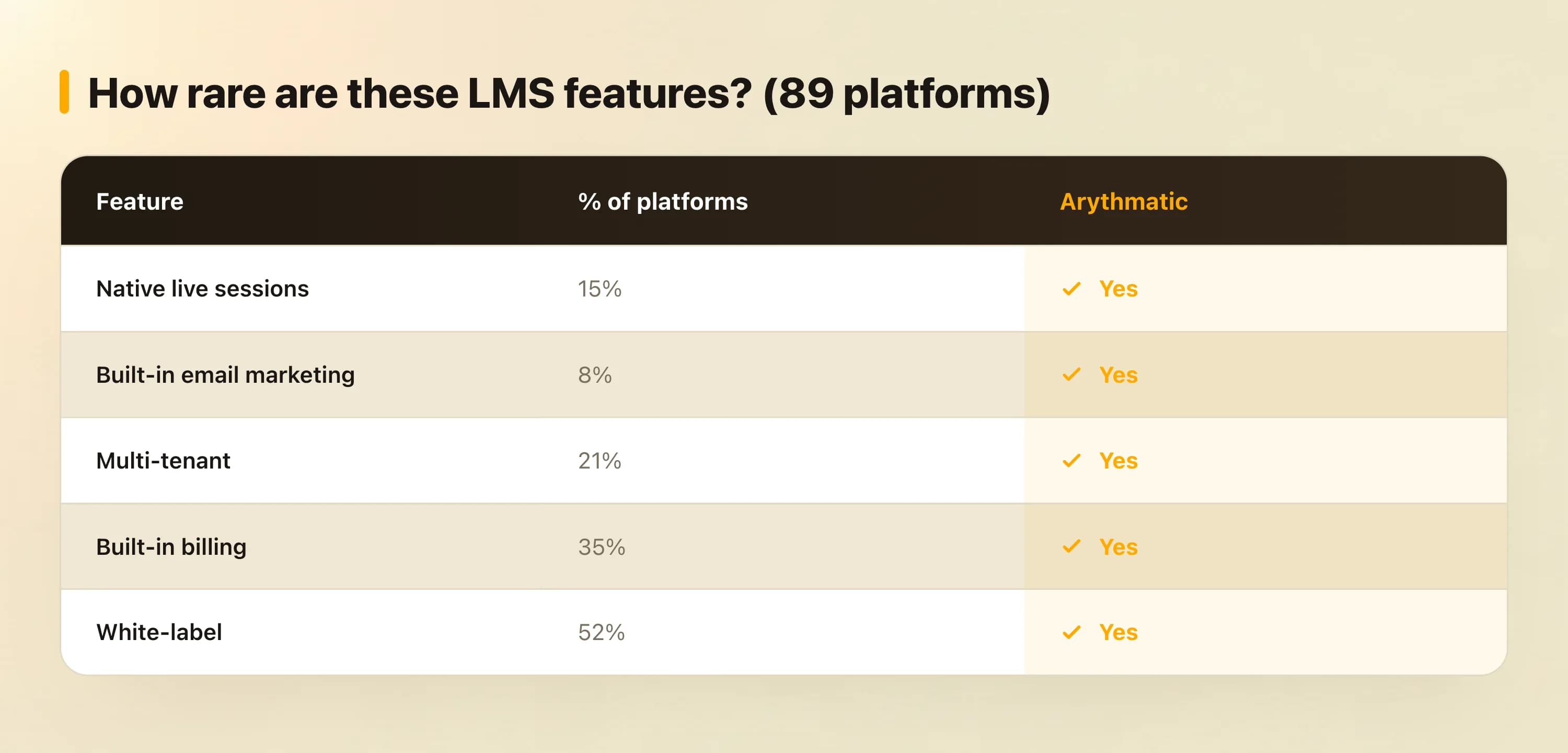
How rare are these LMS features?
Frequently Asked Questions
What is the best cloud-based LMS?
The best cloud-based LMS combines fast deployment, automatic updates, elastic scaling, enterprise security, and transparent subscription pricing. Arythmatic delivers all of these with native live sessions, SCORM/xAPI support, and 0% transaction fees — no servers to maintain.
What is a cloud-based LMS?
A cloud-based LMS (or SaaS LMS) is hosted on the vendor's servers and accessed through a web browser. The vendor handles hosting, security, scaling, backups, and updates, and you pay a recurring subscription instead of a large upfront license.
Is a cloud-based LMS cheaper than self-hosted?
Usually yes once you account for total cost. Self-hosted (e.g. Moodle) appears free but requires hosting, IT maintenance, security patching, and upgrade projects. A cloud LMS folds all of that into a predictable subscription and deploys in days rather than months.
How secure is a cloud-based LMS?
Reputable cloud LMS vendors provide enterprise-grade security — encryption at rest and in transit, access controls, and compliance certifications — often exceeding what individual organizations can maintain in-house. Evaluate data residency for specific regulatory needs.
How fast can a cloud-based LMS be deployed?
Cloud LMS platforms deploy in days to a few weeks for SMBs and 6-12 weeks for mid-market, versus 6-18 months for legacy on-premise systems. Arythmatic customers typically go live within days using the course builder and SCORM import.
Can a cloud-based LMS scale to large workforces?
Yes. Cloud infrastructure scales elastically from dozens to hundreds of thousands of learners without provisioning hardware. Arythmatic's flat-rate pricing means scaling up doesn't trigger per-user cost spikes.
What's the difference between a cloud LMS and a SaaS LMS?
They're the same thing — both describe an LMS hosted by the vendor and accessed over the internet on a subscription. 'SaaS' (Software as a Service) is the business model; 'cloud-based' describes the hosting architecture.
Does a cloud-based LMS work offline?
Core delivery requires connectivity, but many cloud LMS platforms offer mobile apps with offline content download that sync progress when reconnected — useful for frontline and field workforces.
Keep researching
Definitions, alternative platforms, and feature deep-dives relevant to your decision.
Glossary
Learning Management System (LMS)
Glossary
Learning Experience Platform (LXP)
Glossary
SCORM (Sharable Content Object Reference Model)
Glossary
Competency-Based Learning
Buyer guide
Best LMS for Employee Training
Buyer guide
Best LMS for Customer Education & Training
Buyer guide
Best LMS for Compliance Training
Buyer guide
Best LMS Platform for Course Creators
Compare
Thinkific alternatives
Compare
Teachable alternatives
Compare
Kajabi alternatives
Compare
TalentLMS alternatives
Compare
Docebo alternatives
Feature
Course Builder — Create Professional Online Courses
Feature
Live Classes Platform — Host Webinars, Workshops & Virtual Classrooms
Feature
Compliance Training Software — Automate Mandatory Training Programs
Feature
LMS Analytics & Reporting — Data-Driven Learning Insights
Ready to build your academy?
Start your 14-day free trial. No credit card required.